How to synchronize an availability calendar on dobovo.com with Airbnb?
Synchronination of the availability calendars with Airbnb system implies one of two options: export of the calendar or its import. To understand which option you need, pick one of the cases:
You’re filling in an availability calendar on Dobovo system and want to have the same calendar on Airbnb system.
1. Enter the owners control panel on Dobovo – select “Prices and availability” section and after the availability calendar of all your apartments opens – press the green button “ICAL” to the right of the calendar of the selected apartment:

2. In the newly opened window copy the link for export of the availability calendar of the selected apartment in iCalendar/ ICS format:

3. Click “Calendar” section.

4. Next, go to the Availability settings.

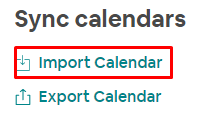
5. Find the “Sync calendars” block at the bottom of the new page and click on the “Import calendar” button.
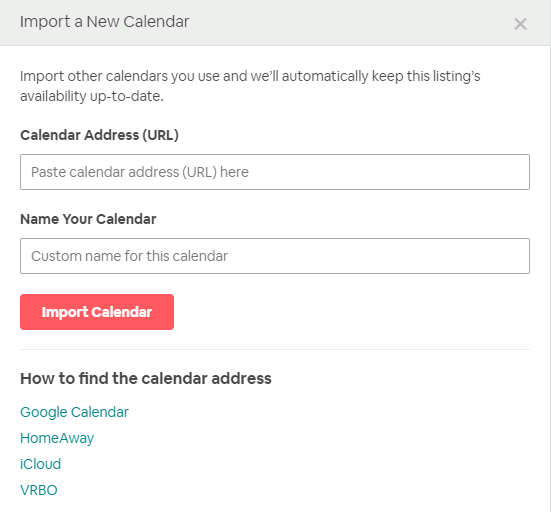
6. On the next page enter a Dobovo calendar link, name it and press Import Calendar.
7. Done! The calendar will automatically update every 8 minutes.
You’re filling in an availability calendar on Airbnb and want Dobovo system load an availability calendar form Airbnb site.
1. Click “Calendar” section.

2. Next, go to the Availability settings.
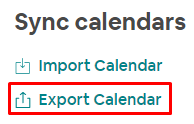
3. Find the “Sync calendars” block at the bottom of the new page and click on the “Export calendar” button.
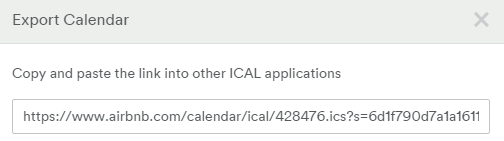
4. Copy the link:
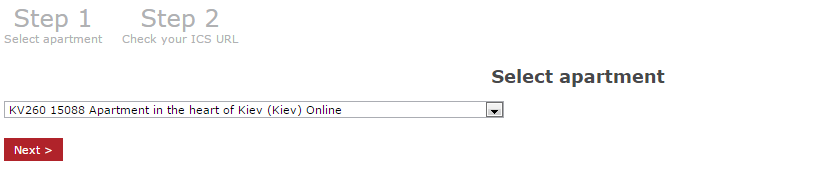
5. Go to the Dobovo account, press Prices and Availability – Synchronization Tool and choose an apartment:
6. Paste the Airbnb link and press Save:
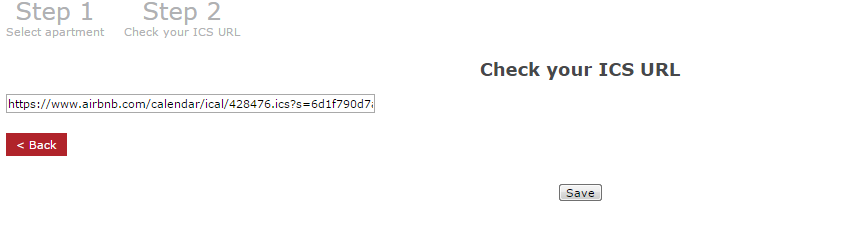
Done! The calendar will automatically update every 8 min.


